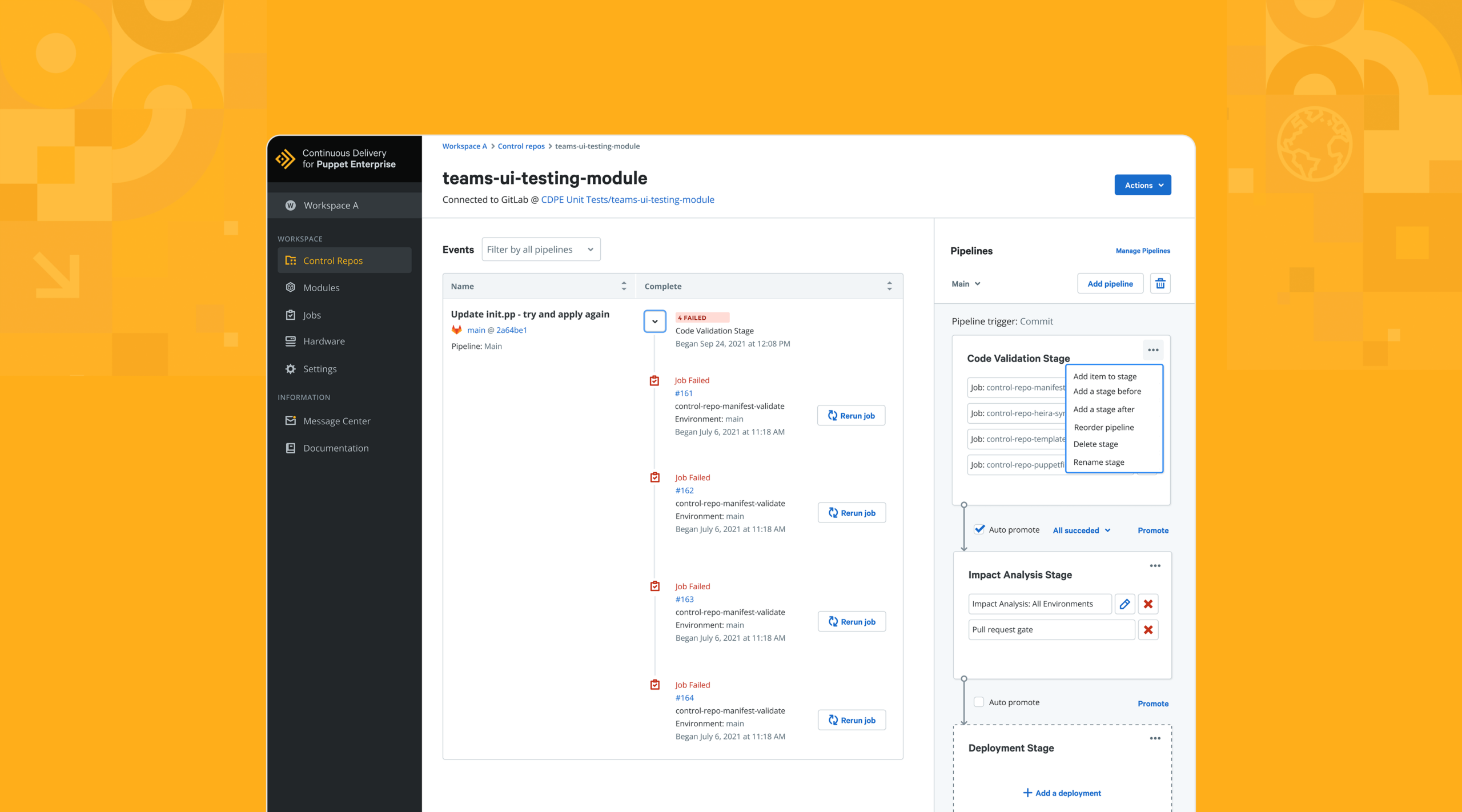
As lead Product Designer at Puppet, I owned the end-to-end redesign of the Pipelines feature within Continuous Delivery for Puppet Enterprise (CD4PE) - a critical component that enables organizations to automate and streamline infrastructure code deployments. The project focused on enhancing usability, scalability, and overall experience, empowering teams to achieve faster and more reliable continuous delivery of Puppet code.
Company:
Puppet Inc.
Contributions:
Product Design
Visual Design
Role:
Product Designer
The Problems
1. User Interface Complexity:
The existing Pipelines feature in Continuous Delivery for Puppet Enterprise suffers from a complex and unintuitive user interface. Users find it challenging to navigate through the various functionalities and perform actions efficiently. The redesign must address this issue by simplifying the UI, updating the older components, improving the information architecture, and providing clear guidance to users throughout the pipeline management process.
2. Limited Scalability:
The current Pipelines feature lacks the ability to handle large-scale deployments and complex infrastructure environments effectively. As organizations grow and their infrastructure needs expansion, the Pipelines feature struggles to accommodate the increased workload. The redesign must focus on enhancing the scalability of the feature, ensuring it can handle the demands of enterprise-level deployments and accommodate intricate infrastructure configurations.
3. Lack of Flexibility and Customization:
Users face limitations in customizing and configuring their continuous delivery pipelines according to their specific requirements. The existing Pipelines feature lacks flexibility in defining deployment stages, managing dependencies, and incorporating testing and release strategies. The redesign should provide users with a more configurable and flexible framework to tailor the continuous delivery process to their unique needs and preferences.
4. Integration Challenges:
Integrating the Pipelines feature with existing version control systems, deployment tools, and monitoring frameworks can be complex and error-prone. The current integration capabilities may not meet the diverse needs of different organizations and their preferred tools. The redesign should address these challenges by providing seamless integration options, clear documentation, and well-defined APIs to enable easy and efficient integration with a wide range of third-party systems.
Areas of Focus
1. Usability: Improve the user interface (UI) and user experience (UX) of the Pipelines feature to make it more intuitive, accessible, and efficient for users.
2. Scalability: Enhance the Pipelines feature to handle large-scale deployments and accommodate complex infrastructure environments.
3. Flexibility: Provide users with more options and configuration capabilities to customize their continuous delivery pipelines according to their specific needs.
4. Integration: Enable seamless integration with version control systems, deployment tools, and monitoring frameworks to facilitate end-to-end automation.
Process and Timeline
With the current problems and areas of focus understood, it was time to start laying out the feasible project timelines and processes for my team. The Project Managers, Developers and myself as the Lead Product Designer determined that a project like this would take roughly 6 months to complete. Where we will focus on the user research (i.e user interviews, competitive analysis, audit of the CD4PE pipeline, journey mapping etc.), ideation, design implementation and post launch testing.
User Research
With the process and timeline defined, comprehensive user research became the foundation of the redesign. I conducted interviews with both internal and external Puppet users to surface real pain points and unmet needs, followed by usability testing sessions to observe firsthand where the existing Pipelines feature caused confusion and frustration. The insights gathered directly shaped the user persona and information architecture that would drive every design decision in the redesign.
Pain Points
1. Complex User Interface:
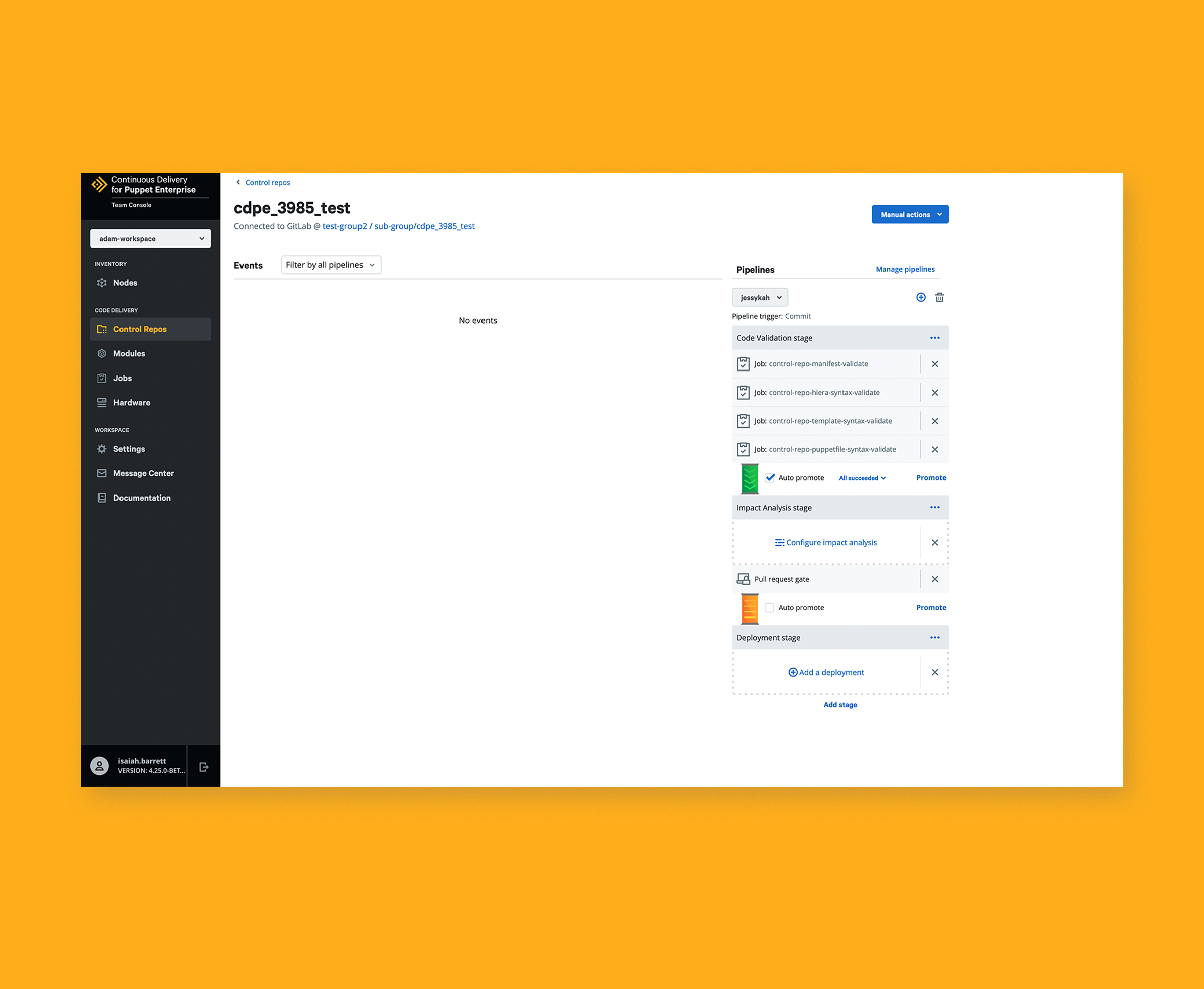
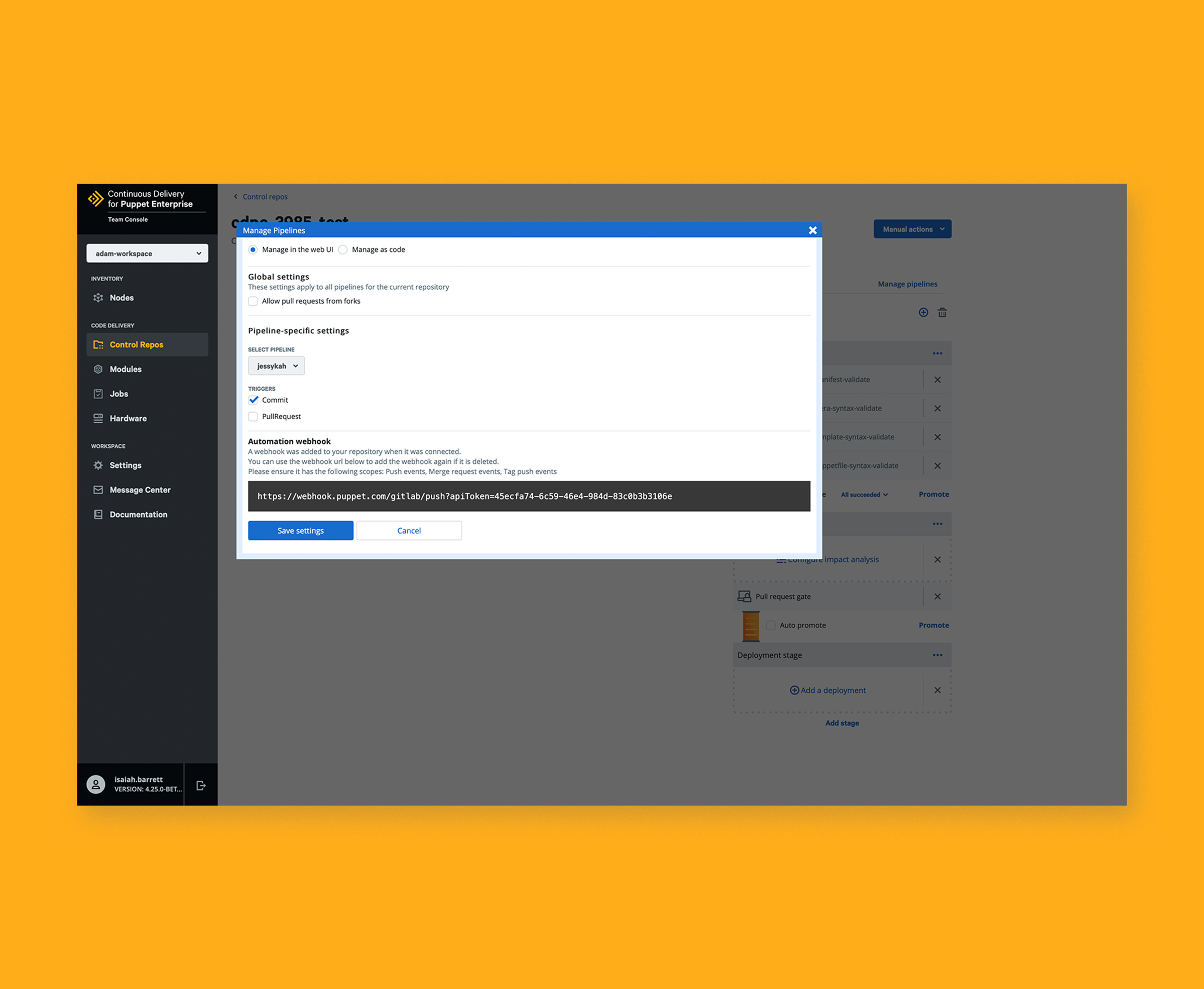
The existing Pipelines feature has a complex user interface that can be overwhelming for users, especially those new to the product. Navigating through the different stages, configuring pipelines, and understanding dependencies can be challenging, leading to a steep learning curve and potential user frustration.
2. Integration Challenges:
Integrating the Pipelines feature with existing version control systems, deployment tools, and monitoring frameworks can be cumbersome. Users often face difficulties in establishing seamless integration, resulting in manual workarounds, complex setups, and potential errors. The lack of standardized integration workflows and documentation adds to the challenge.
3. Performance Bottlenecks:
Users have reported performance issues in the Pipelines feature, such as slow execution of pipeline stages, delays in code deployments, or resource-intensive processes. These performance bottlenecks can disrupt the continuous delivery workflow, leading to longer deployment cycles and reduced productivity.
User Persona
Creating a user persona, helped me to better understand the frustrations and challenges Puppet users were facing on a daily basis with the Pipelines feature. It also helped to see the expectations and needs that they were looking for in a more elevated and redesigned experience.

- Focus on the Pipelines deployment stage feature, impact analysis and management using Puppet's new design system components to create a more seamless experience.
- Enhance the Pipelines feature to handle large-scale deployments and complex infrastructure environments.
- Reduce the amount of steps it takes to deploy and create a pipeline.
- Needs more options to customize continuous delivery pipelines according to specific requirements.
- Needs seamless integration with popular version control systems, deployment tools, and monitoring frameworks.
- Needs more optimization for overall performance to ensure fast and reliable delivery of infrastructure code.
- Very difficult finding comprehensive guides, tutorials, or troubleshooting resources for Pipelines.
- The current Pipelines feature does not provide sufficient insights or metrics to track the progress of deployments, identify bottlenecks, or troubleshoot issues effectively.
- The current feature does not adequately support varying deployment scenarios, such as multi-environment deployments, advanced testing strategies, or customized release processes.



Information Architecture
It was important before completing any UI Design that I stripped out all the visual components and grasped a deep understanding of how Pipelines actually works. This diagram below explains the overall Information architecture of the Pipelines feature.
Style Guide
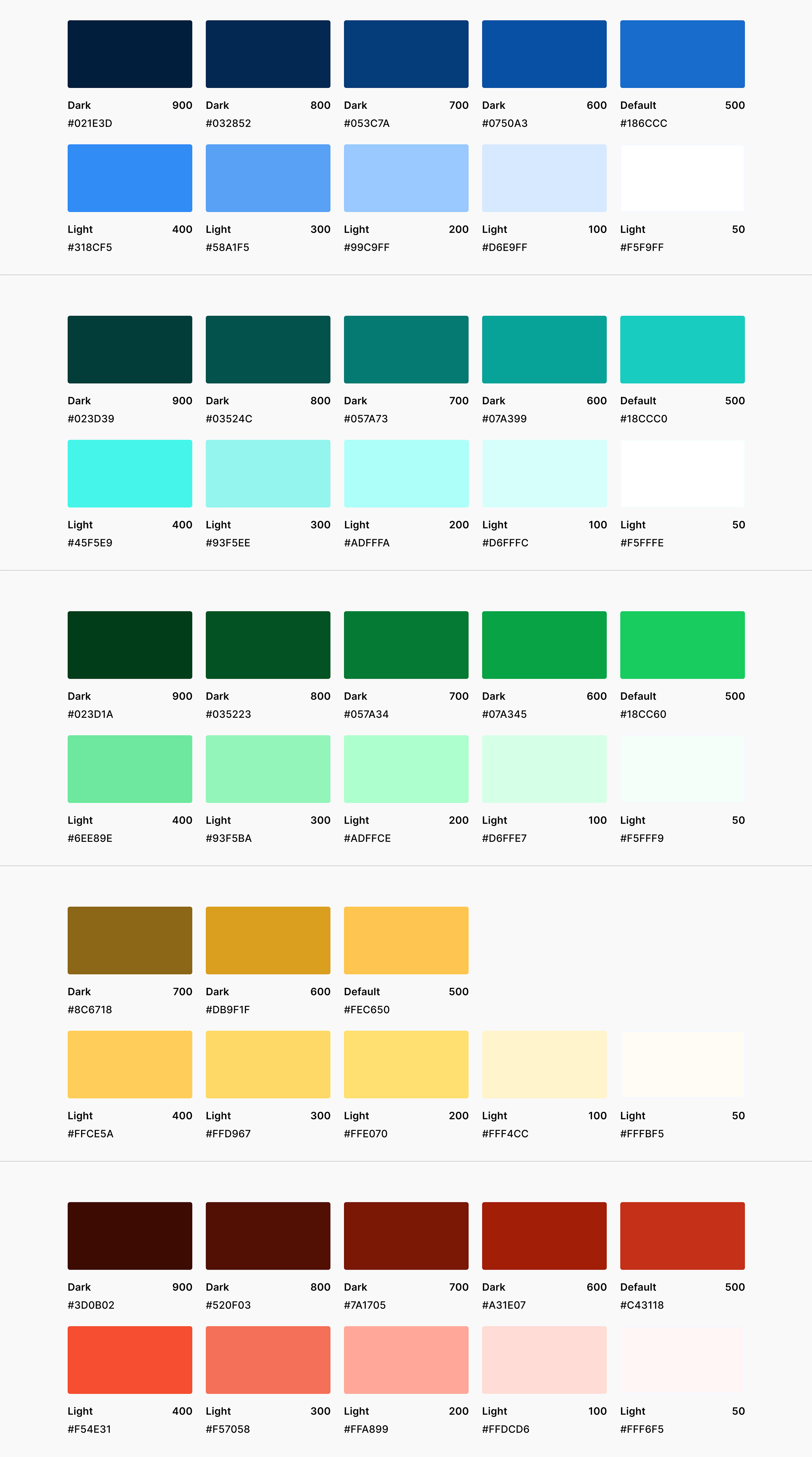
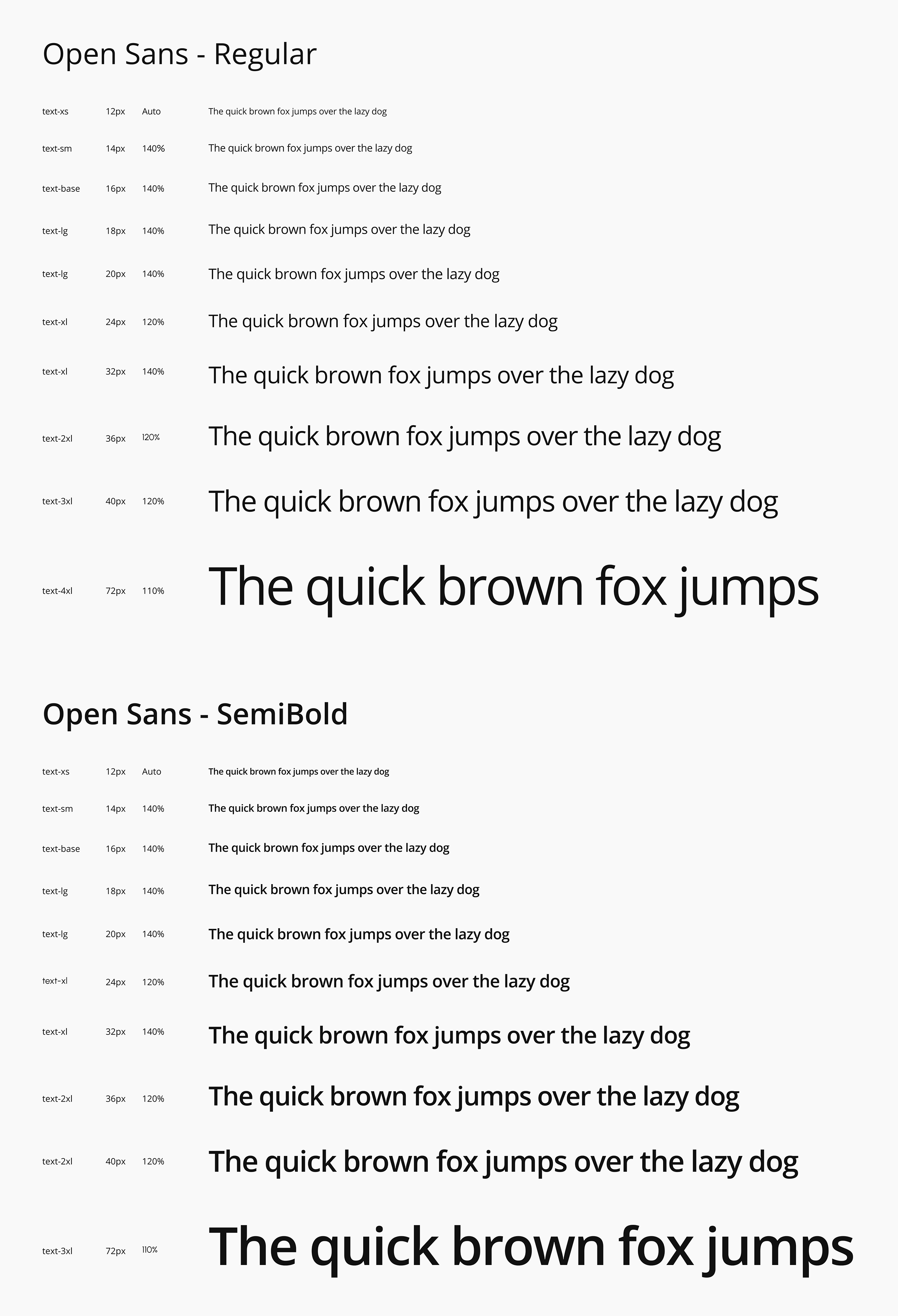
For this redesign, I did not want to make any significant changes to the color palette and the typography, since users have built a strong understanding and familiarity with Puppet’s unique visual identity.
Colors
Typography
UI Designs
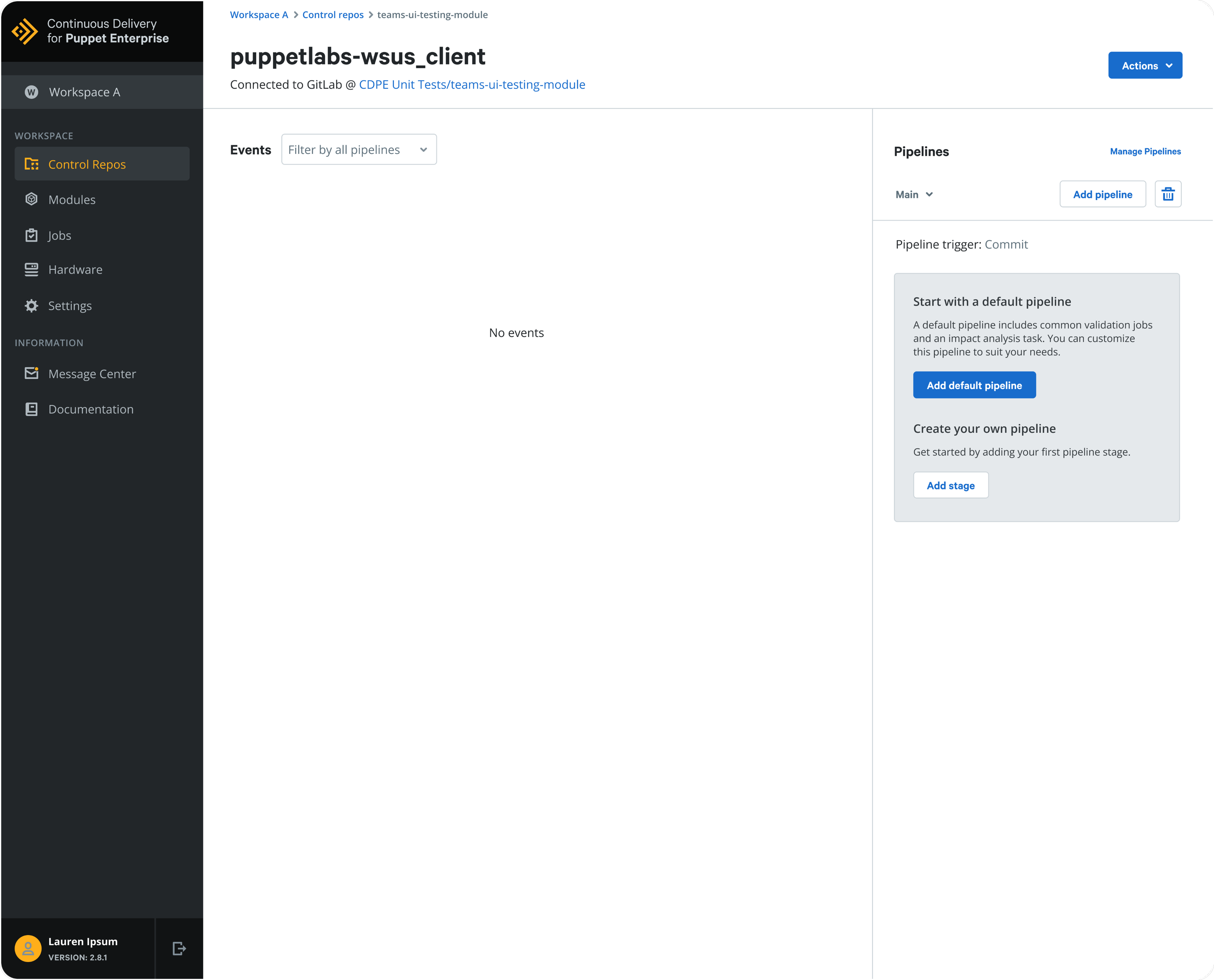
The redesign for the Pipelines feature focused on updating the main layout, the legacy components, the default pipelines interface and the creation of new stages. By doing so, the overall experience and usability of the product greatly increases and makes it easier for users to accomplish large amounts of tasks without previous frustrations.
Pipelines
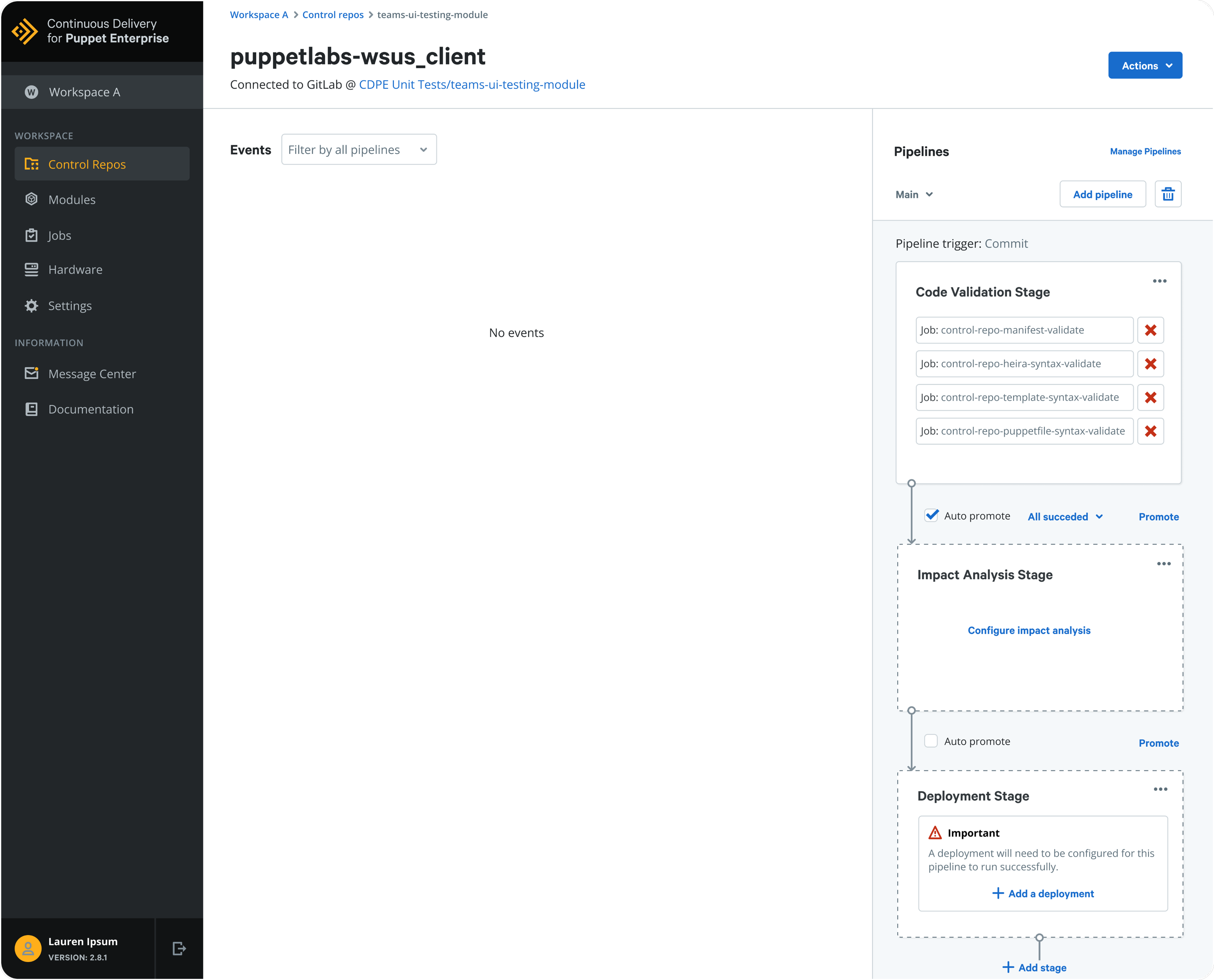
This new redesigned overview screen showcases a new sidebar to the right allowing users to choose from an array of options which include: Manage pipelines, Add pipeline, Add default pipeline, Add stage, and an Actions dropdown on the top.
Add Default Pipeline
Once a user clicks on the “Add default pipeline” button, a newly generated pipelines template is created to give a great foundation to build from. The Pipeline template contains a few common validation jobs and an impact analysis task. The user can then customize this pipeline to suit their needs.
Add a Pipeline
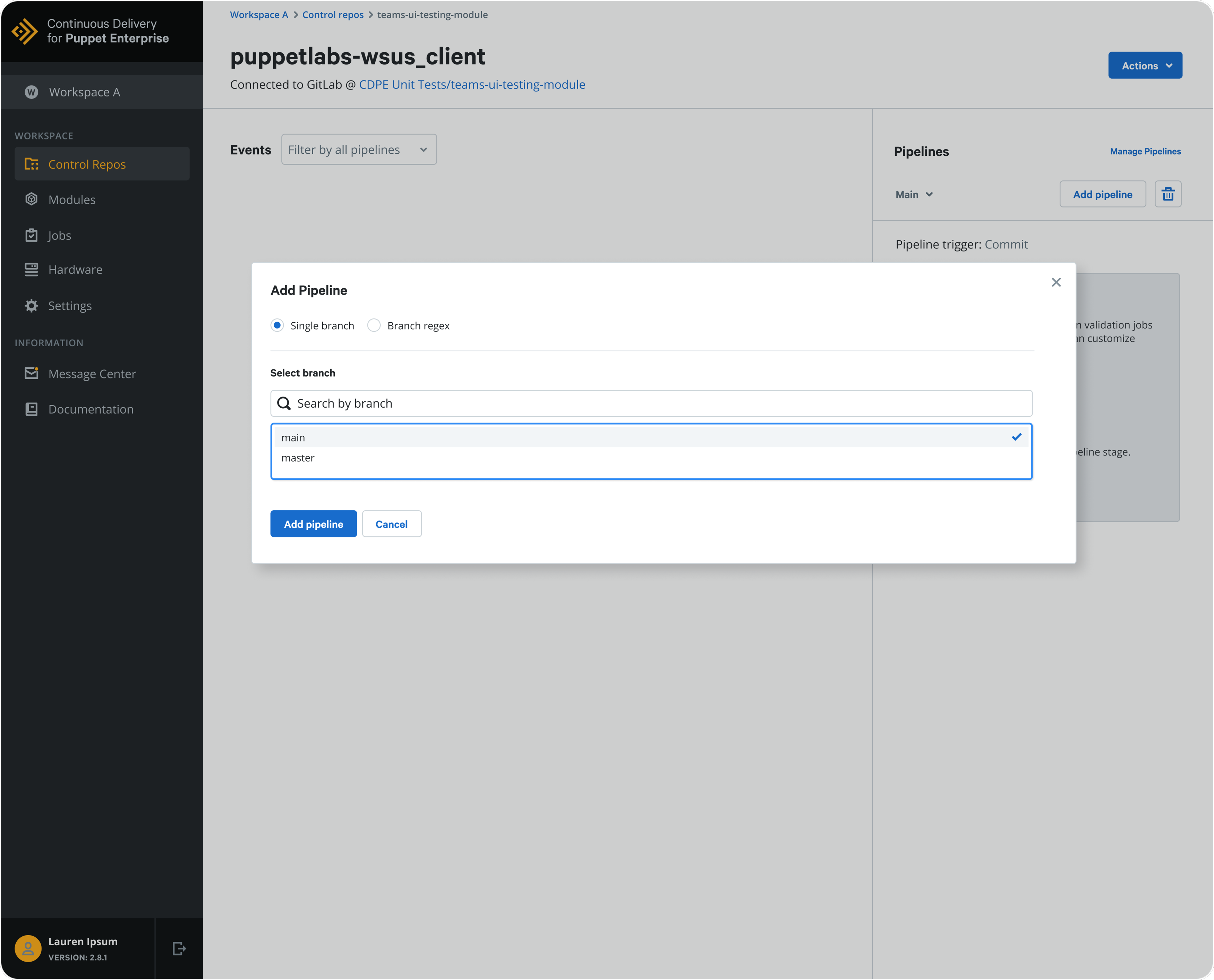
“Adding a pipeline” has a new modal popup feature, giving a more clear and concise interface letting the user choose first from a single branch or a branch regex. After that, they can select a branch by searching the branch repository and finally adding the pipeline.
Manage Pipelines
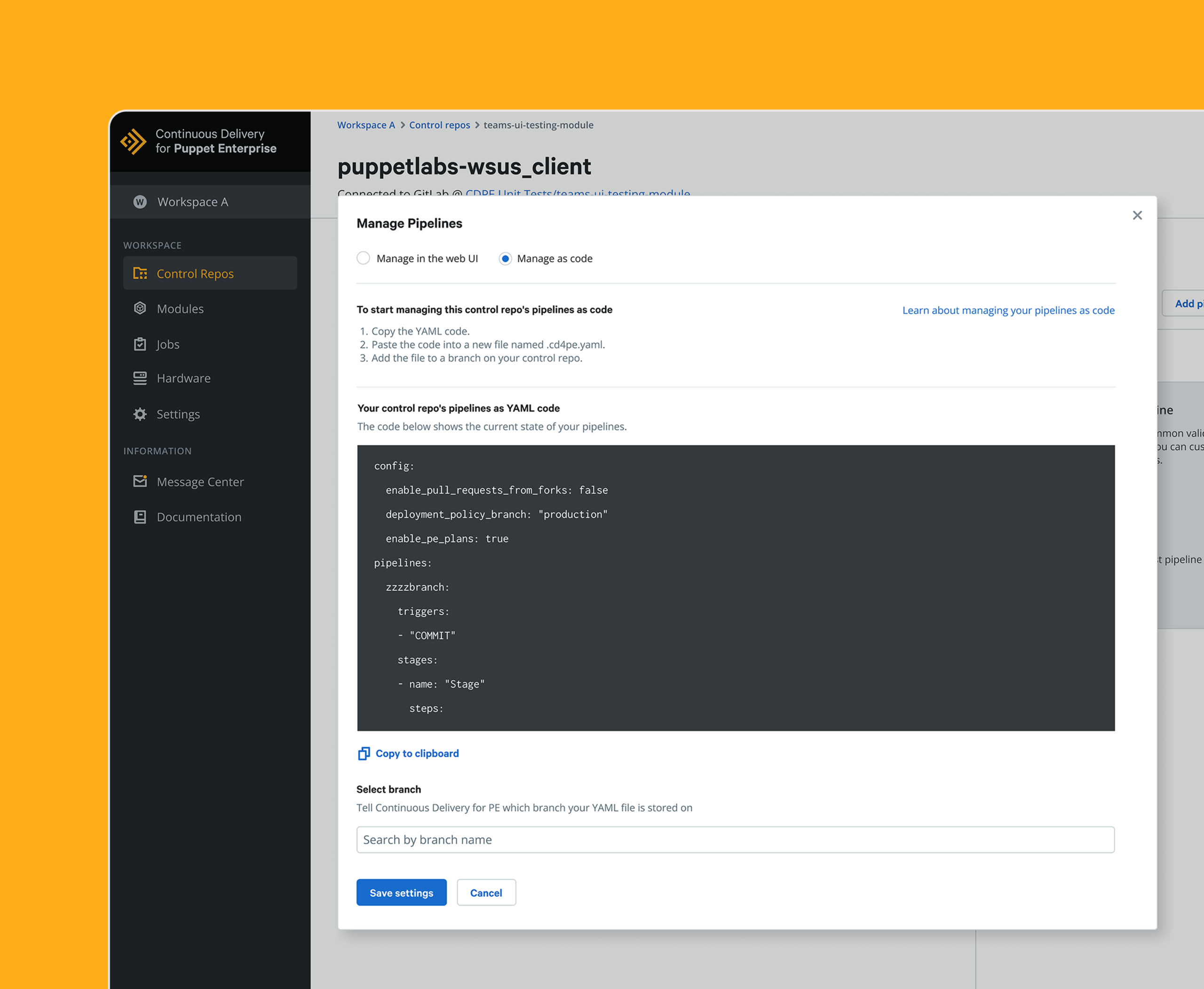
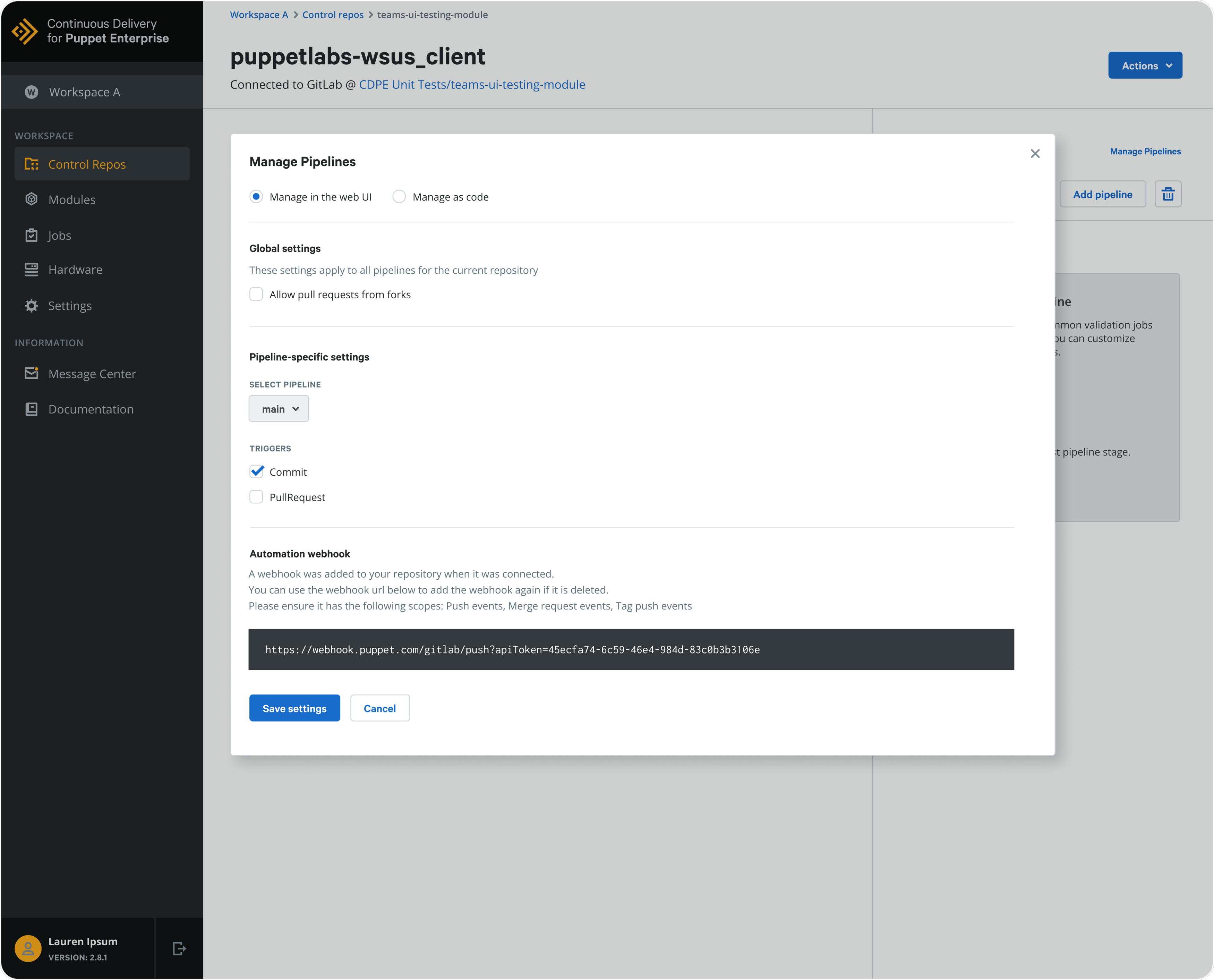
The redesigned “Manage pipelines” feature gives more flexibility for the user now being able to configure pipeline specific settings as well as a new trigger dropdown. The automation web hook is also utilizing a new Puppet design system component.
Add New Stage
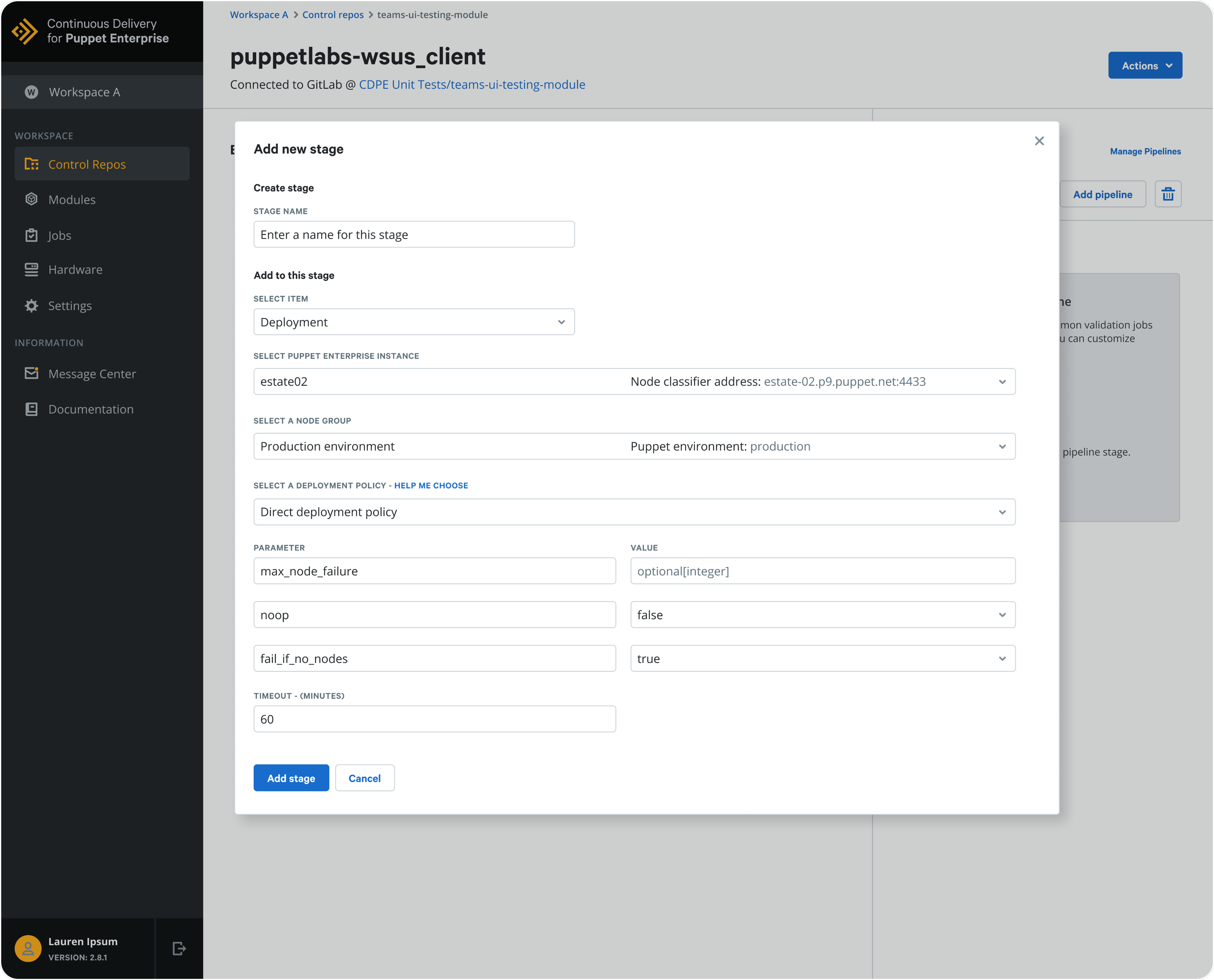
Adding a new stage to create a pipeline from scratch is now easier than ever. Once the user is on the Pipelines overview screen, they can click on “Add stage” and a new popup will show up where they can name the stage, select an item (deployment or impact analysis), select a Puppet Enterprise instance, select a node group, select a deployment policy and set parameters.

The Impact & Results
By overcoming the associated challenges that so many internal and external users brought up, the redesigned Pipelines feature saw significant improvements in key areas:
- 1. 62% Reduction in Lead Time for Changes: Teams moved from code commit to production significantly faster by eliminating manual approval bottlenecks.
- 2. 45% Improvement in Change Failure Rate: Enhanced automated testing and validation gates ensured that infrastructure code was more stable before deployment.
- 3. 3.5x Increase in Deployment Frequency: Improved system scalability allowed global engineering teams to run thousands of concurrent pipelines without performance degradation.
This redesign ultimately led to a more improved software delivery lifecycle, allowing organizations like Porsche, Walmart and the NYSE to manage complex, hybrid-cloud environments with unprecedented speed and confidence.